Find an experience
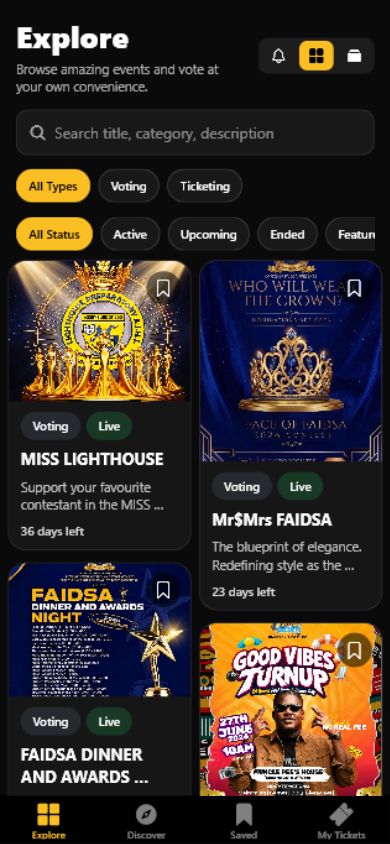
Search public campaigns and browse supported type and status filters. Open the details before choosing how to participate.
SparkGlim Audience App
Discover campaigns, take part in awards voting and keep your event tickets together. SparkGlim brings the participant side of the platform to your phone.
Different campaigns, different ways to take part. Open a campaign to see the options its organizer has enabled.
Search public campaigns and browse supported type and status filters. Open the details before choosing how to participate.
Select an available ticket type and quantity, then complete the attendee information required by that event.
Explore awards categories and nominees. Voting availability, prices and public counts follow each campaign’s rules.
Open a fundraising campaign to see its donation options. Donor fields and anonymous contributions depend on its settings.
My Tickets
Verify the contact linked to your purchase to access eligible tickets. Open a ticket’s details and QR when you need them, with supported options to save the QR image to your device.
Explore public campaigns before opening ticket access or account-specific features.
Use the supported phone or email OTP option when the app asks. This participant access is separate from Creator login.
Allow notifications or calendar/reminder access only when you want those features. Dated saved campaigns can offer reminders where your device supports them.
Tickets, nominations, voting and donations have separate requirements. Availability is determined by the campaign and SparkGlim Server.
The app opens the server-created secure checkout. The server determines prices, supported methods and the confirmed outcome.
This website supports five languages. Native screens currently have different language coverage; a translated website does not mean the app is fully translated. Store access and payment availability may also differ by region.
Get the app
Use the installation links currently configured by SparkGlim. The destination provides its device, region and release requirements.
A configured release is not a guarantee of store availability in every country. Check the destination before installing. Keep an existing installation up to date through its supported update route.
No. The Audience App is for discovering and participating. Organizers use SparkGlim Creator for authorized campaign management and operations.
Discovery updates, contact verification and checkout require a connection. Save a supported ticket QR image in advance where available; admission still follows the event’s checks.
The app treats fundraising as a distinct campaign type. Choose its dedicated Explore filter or open the fundraiser’s shared link; a campaign must also be publicly available.
Yes. Public campaign discovery and supported participation flows remain available on the web. Choose the route that works for your device.
Explore real campaigns now, or install through an available release link above.
Looking for campaign management? Explore Creator App