
Start with the purpose

A ticket is not a vote. A donation has its own story.

SparkGlim keeps the information, actions and rules specific to each campaign type. The platform connects these experiences without making them interchangeable.

Event Ticketing and verification

Connect event discovery, ticket options, required attendee information and authorized ticket access.

An event presents its actual ticket types and availability. Checkout and admission use server-controlled records.

Explore this capability
Awards and Digital Voting

Give awards campaigns their own categories, nominees, nominations and public participation journey.

Visitors choose a campaign, browse categories and nominees, and follow the configured vote or nomination flow.

Explore this capability

Fundraising and donations

Present a cause, beneficiary and fundraising goal, then guide supporters through the donation flow.

Organizers prepare a campaign for review. Approved public pages receive donations through configured server checkout.

Explore this capability

Behind the experience

Prepare carefully. Manage with the right permissions.

Creator tools connect campaign preparation, participant information and operational review. Ticketing, awards and fundraising have different setup paths, and a saved draft is not an approved or published campaign.

  1. Prepare

    Choose the campaign type and complete its actual content, options and required information.

  2. Review

    Use the existing preview and submission process. Publication follows the campaign’s review and visibility rules.

  3. Operate

    Work within assigned permissions, review server records and use the supported participation or check-in flow.

Explore Creator tools
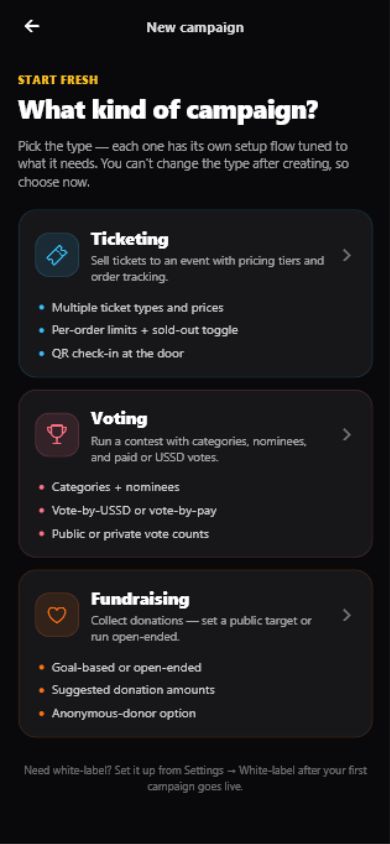
Creator App interface offering Ticketing, Voting and Fundraising campaign setup
Existing Creator App campaign-type selection. Shown as a product interface; available channels and actions depend on campaign settings and permissions.

The capability atlas

Find the capability that fits your work.

Each entry explains its purpose, practical workflow and access boundary. Use the product page for current configuration, campaign requirements and release guidance.

Participation

Event Ticketing and verification

Connect event discovery, ticket options, required attendee information and authorized ticket access.

For
Ticket buyers and event teams
How it works
An event presents its actual ticket types and availability. Checkout and admission use server-controlled records.
A practical use
Offer several ticket classes, then check an attendee’s credential at the entrance.
Access and availability
Ticket rules, registration and check-in permissions vary by campaign. A QR image alone does not authorize admission.
Explore this capability
Awards and Digital Voting

Give awards campaigns their own categories, nominees, nominations and public participation journey.

For
Voting participants, nominees and awards organizers
How it works
Visitors choose a campaign, browse categories and nominees, and follow the configured vote or nomination flow.
A practical use
Run category-based awards with campaign-specific nomination windows and vote options.
Access and availability
Public counts, approvals, prices and deadlines follow campaign settings. This is separate from SEVA controlled elections.
Explore this capability
Fundraising and donations

Present a cause, beneficiary and fundraising goal, then guide supporters through the donation flow.

For
Contributors, campaign organizers and beneficiaries
How it works
Organizers prepare a campaign for review. Approved public pages receive donations through configured server checkout.
A practical use
Share a focused campaign story and show permitted progress toward its goal.
Access and availability
Goal visibility, donor privacy and contribution options are campaign-specific. No universal tax or payout guarantee is implied.
Explore this capability

Organizing and operations

Campaign management

Prepare campaign content, artwork and product-specific settings in the existing Creator workflows.

For
Creators and authorized campaign managers
How it works
Choose Ticketing, Voting or Fundraising, save a draft and complete the required review submission.
A practical use
Prepare an event’s ticket options before making its public page available.
Access and availability
Draft creation, editing, submission and publication are different actions with server-enforced permissions.
Explore this capability
Central checkout

Use SparkGlim’s existing checkout for eligible ticket purchases, paid votes and donations.

For
Buyers, voting participants and contributors
How it works
The campaign flow requests a server-created checkout session and hands the visitor to the central payment experience.
A practical use
Complete a ticket order using the methods offered for that campaign.
Access and availability
The server controls amounts, fees, currency, payment confirmation and fulfillment. Provider and country availability is configured.
Explore this capability
Audience participation

Discover public campaigns and keep the ticket buyer, voter and contributor journeys clear.

For
Attendees and campaign supporters
How it works
Open the relevant campaign, follow its participation requirements and access eligible tickets through the supported account flow.
A practical use
Find an event, complete its order and return to the authorized ticket view.
Access and availability
Private campaigns and restricted records remain protected. App availability follows the configured store listing.
Explore this capability
Creator and organizer tools

Bring authorized campaign management, team responsibilities and connected ticket scanning into the Creator experience.

For
Creators and assigned organizer teams
How it works
Sign in with the supported creator or organizer path and use tools granted by your role and campaign assignment.
A practical use
Give a team member the campaign responsibilities they are authorized to perform.
Access and availability
Server-connected scanning requires a valid response. Website language support does not guarantee every native app locale or store release.
Explore this capability
Reports and operational visibility

Review authorized campaign activity, recorded transactions and available exports without mixing unrelated products or currencies.

For
Authorized campaign and account managers
How it works
Use the account’s existing report and export tools. Some reports are prepared on the server before they become available.
A practical use
Review ticket activity or recorded contributions for the campaign you manage.
Access and availability
Permissions control report access. Transaction records are not invented traffic counts; financial snapshots retain their recorded currency.
Explore this capability
Notifications and campaign communication

Keep relevant account, campaign and transaction messages within the existing communication tools.

For
Participants and authorized campaign teams
How it works
Use authorized messaging settings and supported channels; app notifications depend on the visitor’s system permissions and preferences.
A practical use
Receive a relevant campaign update or review the account notification inbox.
Access and availability
Valid contacts, consent, provider configuration and delivery status matter. No universal instant delivery or unrestricted automation is promised.
Explore this capability
Security and permissions

Keep account authorization, campaign scope and private integration credentials separate from public discovery.

For
Account holders, teams and developers
How it works
The server enforces the applicable role and access contract. Private Organization signing belongs on a trusted backend.
A practical use
Give an integration its permitted scope without exposing private keys in browser code.
Access and availability
Security depends on implementation, configuration and operations. No blanket certification, compliance or absolute-security guarantee is claimed.
Explore this capability

Applications and integrations

White Label solutions

Present approved SparkGlim capabilities through an organization’s branding and configured public surfaces.

For
Approved organizations, partners and resellers
How it works
Choose the Organization or separate Reseller model, review requirements and follow the existing onboarding process.
A practical use
Plan a branded ticketing or awards experience with the appropriate account model.
Access and availability
Organization keys and Reseller member sessions are different contracts. Branding or a country selection does not activate payments or domains.
Explore this capability
Public APIs and developer resources

Use the existing Developer reference to distinguish public discovery from approved account integrations.

For
Developers and approved integration teams
How it works
Choose a documented contract, read its actual request fields and use the required server-side authentication where applicable.
A practical use
Build public campaign discovery or a permitted Organization integration from exact endpoint documentation.
Access and availability
Source implementation is not production activation. Do not infer undocumented endpoints, general iframe embeds or outbound webhook subscriptions.
Explore this capability
Audience, Creator and Desktop applications

Choose an audience app, authorized creator workspace or desktop event-operations environment for the task.

For
Participants, creators and venue operators
How it works
Review each application’s product page for the configured store links, setup and supported workflows.
A practical use
Access tickets on mobile or prepare compatible desktop equipment for event operations.
Access and availability
Creator Android has no configured install link. Desktop is request-access; its native client remains in development. Hardware support is protocol-specific.
Explore this capability
Plugins and AI integrations

Review the actual organizer-integration catalog and understand account consent before connecting a supported assistant.

For
Authorized creators and integration evaluators
How it works
A permitted integration uses granted scopes and existing campaign permissions. Private drafts and review submission remain distinct from publication.
A practical use
Prepare a campaign draft with an assistant, then review it through the supported workflow.
Access and availability
The current catalog marks Codex disabled. WordPress requires compatibility review. Catalog activity is not an install link, marketplace approval or a connected account.
Explore this capability
SEVA controlled-election architecture

Explore a separate pre-release design for locally hosted, supervised institutional elections.

For
Institutions evaluating controlled-election requirements
How it works
Review its source-backed components, lifecycle and incomplete integration/verification work before discussing an assessment.
A practical use
Prepare a requirements brief for a supervised technical and operational assessment.
Access and availability
Not suitable for any live election. Operational access requires authorized SparkGlim Security and Technical Teams; a consultation does not approve deployment.
Explore this capability

Choose your starting point

Participation, management and integration have different entrances.

Your purposeStart hereWhat stays in control
Attend, vote or contributeExplore campaignsThe chosen campaign controls its requirements, availability, privacy settings and selling currency.
Create and manage campaignsExplore Creator toolsAccount roles and campaign assignments determine management access. A role selector cannot grant permissions.
Build a supported integrationPublic APIs and developer resourcesUse the documented public or approved account contract. Keep private keys on your server.

Choose your starting point