
Ticket fraud presents a substantial challenge to event organizers, campus groups, and community organizations globally, with high-profile occurrences often peaking during major cultural and holiday celebrations, such as the peak December festival season in Ghana. As ticket prices rise and demand for popular gatherings increases, bad actors exploit structural vulnerabilities in traditional paper ticketing systems and poorly secured digital distribution channels. These exploits range from basic copy-and-paste duplication of digital receipts to advanced social engineering schemes where invalid or forged entry passes are sold directly to unsuspecting buyers through unauthorized third-party platforms.
To mitigate these ongoing security challenges, modern campaign and ticketing platforms utilize Quick Response (QR) code verification systems. By transforming simple ticketing credentials into dynamic, encrypted data points, QR verification establishes a robust validation loop that confirms a ticket's authenticity in real-time. This article outlines the mechanisms of secure QR ticket scanning, analyzes common fraud patterns, and provides practical guidelines to help event staff secure gate operations without introducing unnecessary friction for attendees.
Common Ticket Fraud Patterns and Gate Vulnerabilities
Fraudulent actors target predictability and haste at entry points. When event coordinators rely on outdated confirmation methods, they expose their operations to preventable risks. Understanding these common patterns is the first step toward implementing defensive countermeasures:
- Ticket Duplication and Photocopying: A single, valid PDF ticket is purchased legitimately and then shared, printed, or screenshotted multiple times. Without digital validation, multiple individuals can successfully gain entry using the same visual document, leading to venue overcrowding and lost revenue.
- Digital Tampering and Image Editing: Basic graphic design tools allow malicious actors to modify critical text on outdated ticket files, such as changing a standard general admission ticket to a VIP pass or altering the date of an expired ticket to match a current event.
- Speculative Listing and Reselling: Scammers list non-existent tickets on secondary marketplaces. Once they receive payment, they send either a falsified ticket or a single genuine ticket that has already been distributed to dozens of other victims.
The Cryptographic Architecture of Secure QR Codes
Unique Payload Generation
A secure QR code is not just a standard web URL converted into a pixel grid. Instead, it serves as a visual wrapper for an encrypted, unique identifier generated specifically for that individual transaction. This token is cryptographically signed and stored securely in the central ticketing database. Because the payload contains high-entropy data, it is computationally impossible for an external party to guess or fabricate a valid code sequence, ensuring that only officially issued tickets pass the scanner's integrity check.
Real-Time Check-In State Syncing
The primary defense against duplicate ticket presentation is the transactional check-in state. When a QR code is scanned, the validating device queries the central database to check the ticket's current status. The system changes this state from 'unscanned' to 'scanned' instantly. If a duplicate copy of that QR code is presented at another entrance even seconds later, the scanning application flags the ticket as already redeemed, displaying the exact timestamp of the original entry. This real-time synchronization is essential for multi-gate events where offline or isolated ticket lists would fail to capture parallel entry attempts.
Implementing Gate Security with Mobile Scan Controls
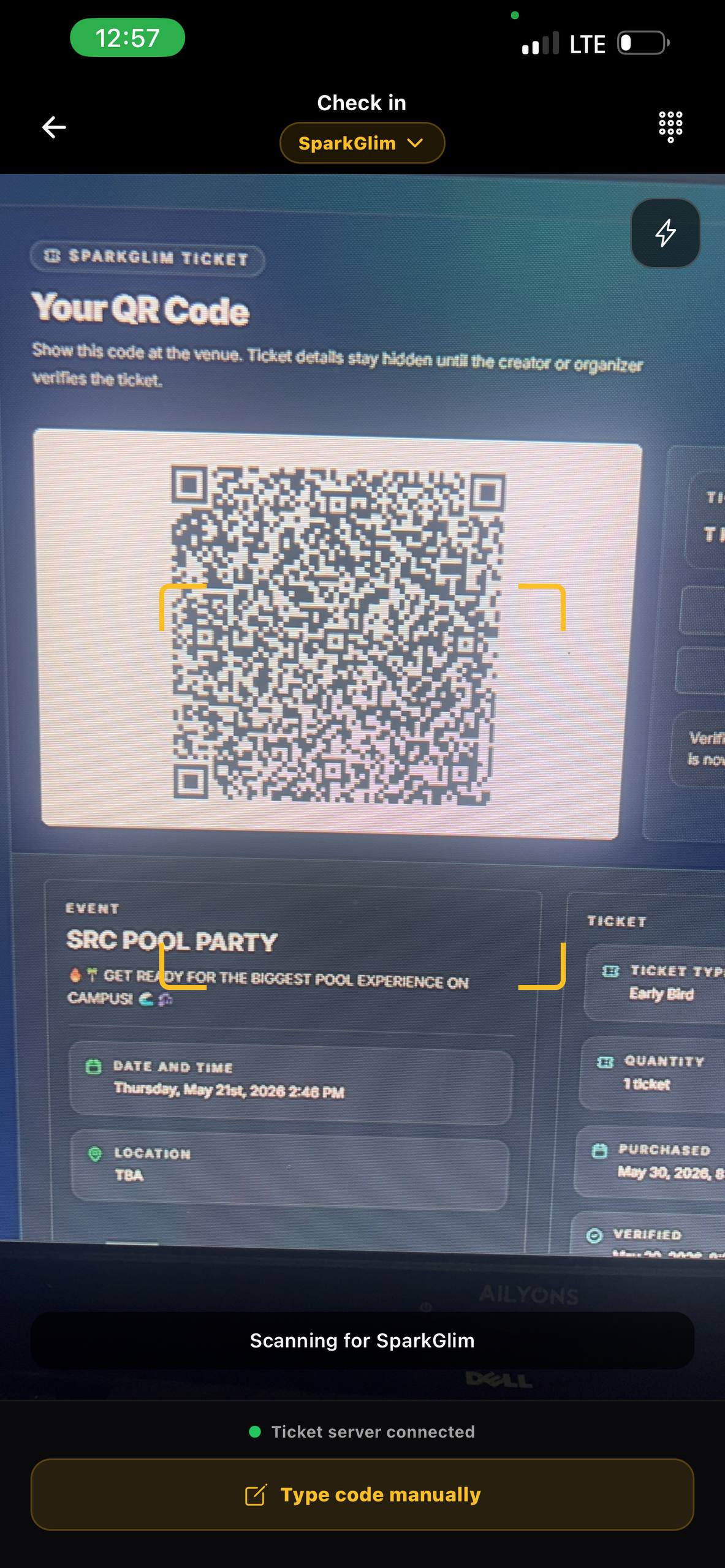
Equipping entry management teams with the right tools is critical to maintaining both security and smooth crowd flow. Instead of relying on expensive, proprietary hardware, modern event coordinators can utilize accessible smartphones to scan and verify entries. Through specialized tools like the SparkGlim mobile creator app, organizers can turn standard mobile devices into high-speed validation nodes capable of rapid focal scans, minimizing entry queues even under demanding conditions.
To ensure maximum efficiency during peak gate hours, staff deployment should follow a structured operational layout. Rather than having a single staff member manage the crowd, check tickets, and hand out physical wristbands simultaneously, roles should be split. Position dedicated scanners slightly ahead of the entry threshold to handle digital validation exclusively, allowing secondary team members to focus on physical security checks and entry band distribution.
Privacy and Data Minimization at the Gate
While gate security requires thorough verification, it must not compromise the privacy of your attendees. Best practices in digital ticketing mandate a 'least-privilege' approach to data exposure. Scanning applications should only display information essential for entry processing, such as the ticket holder's tier (e.g., VIP, Early Bird) and the validation status. Sensitive personal details, complete transaction histories, and contact information should remain encrypted and hidden from gate personnel to prevent accidental data leaks or unauthorized visual access during high-volume scanning sequences.
Incident Response and Escalation Procedures
Despite having advanced verification tools, operational anomalies will occur. Having a clear escalation plan ensures that customer service issues do not disrupt the main entry flow. Implement these standardized responses for common gate issues:
- The 'Already Scanned' Scenario: When a scan returns a duplicate warning, politely direct the ticket holder to a designated resolution desk away from the main queue. At the resolution desk, supervisors can check the transaction history, verify the purchaser's ID, and determine if the ticket was shared or compromised.
- Dim or Damaged Phone Screens: If a phone screen is cracked or the brightness is too low, the scanner may struggle to read the code. Have staff instruct attendees to maximize screen brightness, or manually look up the secure reference ID associated with the purchase.
- Intermittent Internet Outages: In high-density environments, cellular networks can become congested. Use local caching configurations where supported, or establish a dedicated Wi-Fi network specifically reserved for scanner synchronization.
Limitations of QR Code Verification
While QR-based verification significantly reduces ticket fraud, organizers must understand its inherent boundaries to avoid false expectations of perfect security. QR verification cannot prevent offline social engineering, such as an attendee willingly giving their phone to another individual after receiving an entry wristband. Furthermore, digital tools do not replace the need for physical perimeter security, visual bag checks, and trained security personnel. Technology acts as a shield for your revenue and access control, but it must be paired with operational vigilance on the ground.
Pre-Event Ticket Security Checklist
- Ensure all scanning devices are fully charged and equipped with backup external battery packs.
- Download the latest mobile scanning software updates before arriving at the venue.
- Set up a dedicated local network or confirm cellular signal strength at all entry gates.
- Conduct a brief training session with gate staff on how to handle 'Already Scanned' alerts.
- Set up a clearly marked 'Customer Support and Escalation Desk' away from the main entry queues.
Frequently Asked Questions
How does QR ticket verification prevent double-entry at events?
When a ticket is scanned, its unique cryptographic ID is marked as 'redeemed' in the central database. If anyone attempts to scan a duplicate printout or screenshot of that same ticket, the system immediately flags it as already scanned, preventing double-entry.
What happens if there is no internet connection at the venue?
While real-time syncing requires an active internet connection, systems can utilize localized caching or offline sync windows to maintain basic entry operations, although real-time cross-gate prevention is limited during complete outages.
Can a QR code be easily copied or screenshotted?
Yes, an image of a QR code can be screenshotted or copied, but only the first copy scanned at the gate will be validated. Any subsequent attempts to use the same code will be rejected by the verification system.
Does scanning a QR code expose the attendee's personal data to gate staff?
No. Secure scanning interfaces strictly follow data minimization practices, showing only the ticket's validity status and ticket tier (e.g., General Admission) to protect the attendee's privacy.
By prioritizing cryptographic security, training scanning staff, and setting up clean physical queues, event coordinators can eliminate standard ticket duplication and protect their bottom line. To discuss specific integration setups or seek guidance for your next major campaign, contact our technical support team at SparkGlim Contact.
Article gallery
Frequently asked questions
How does QR ticket verification prevent double-entry at events?
When a ticket is scanned, its unique cryptographic ID is marked as 'redeemed' in the central database. If anyone attempts to scan a duplicate printout or screenshot of that same ticket, the system immediately flags it as already scanned, preventing double-entry.
What happens if there is no internet connection at the venue?
While real-time syncing requires an active internet connection, systems can utilize localized caching or offline sync windows to maintain basic entry operations, although real-time cross-gate prevention is limited during complete outages.
Can a QR code be easily copied or screenshotted?
Yes, an image of a QR code can be screenshotted or copied, but only the first copy scanned at the gate will be validated. Any subsequent attempts to use the same code will be rejected by the verification system.
Does scanning a QR code expose the attendee's personal data to gate staff?
No. Secure scanning interfaces strictly follow data minimization practices, showing only the ticket's validity status and ticket tier (e.g., General Admission) to protect the attendee's privacy.
Found this helpful?



Comments (0)