
Managing events, digital voting, and fundraising campaigns requires a robust coordination interface that translates user interactions into real-time operational data. The SparkGlim Creator App serves as this essential nerve center, designed specifically for organizers, campus leaders, businesses, and community creators. Operating in Ghana and other supported markets, the app bridges the gap between creator administration and participant engagement, ensuring that whether you are running a high-stakes campus election, a commercial music concert, or a community fundraising drive, you have complete oversight from your mobile device.
Mobile-first accessibility is at the heart of the SparkGlim ecosystem. With varying infrastructural demands across regions, creators need tools that perform reliably under different network conditions. By providing dedicated modules for campaign configuration, live ticket validation, team delegation, and wallet tracking, the SparkGlim Creator App eliminates the necessity of managing multiple disconnected third-party platforms. It brings all backend utilities into a unified, secure portal optimized for immediate field execution.
Comprehensive Campaign Management and Control
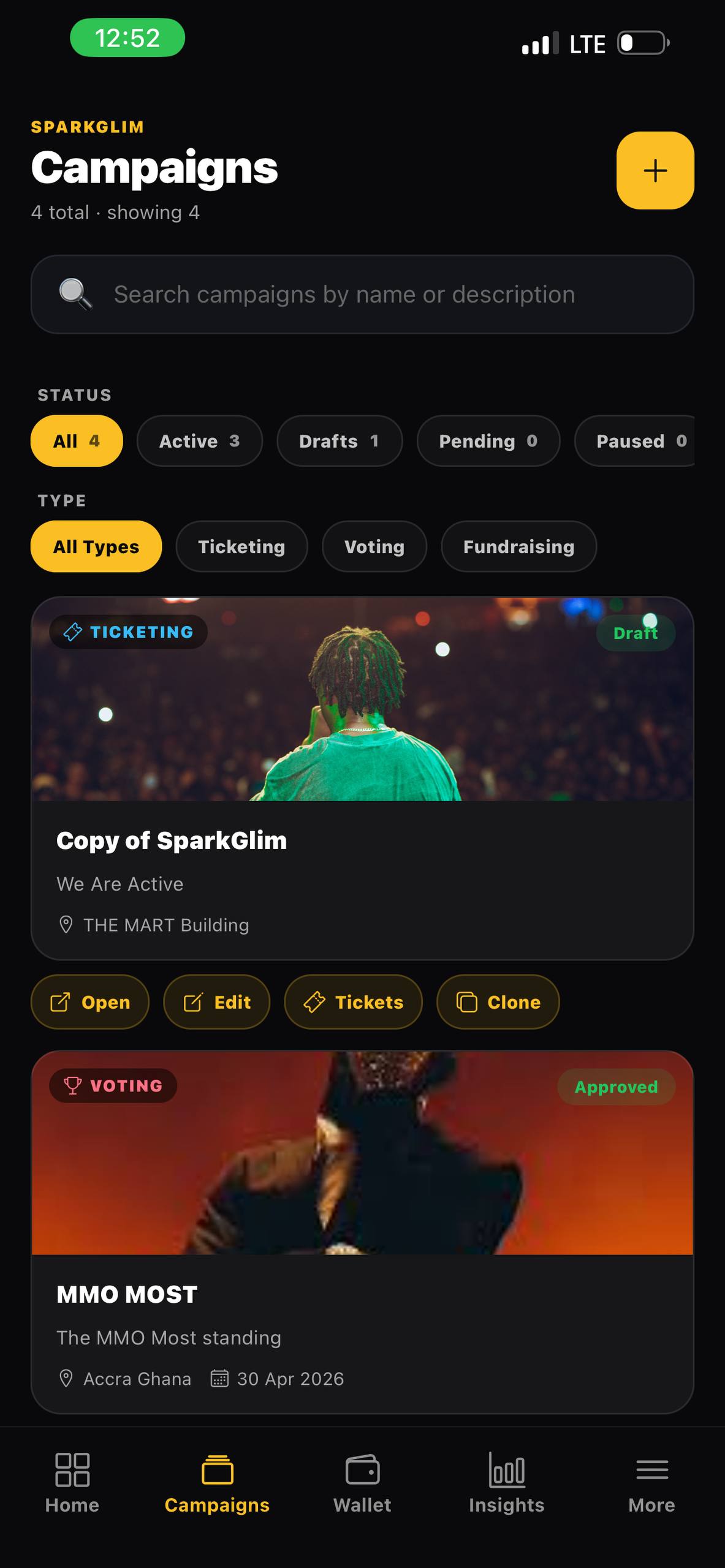
The SparkGlim Creator App gives organizers direct control over their public campaigns. Through the intuitive creation interface, you can initialize a broad variety of campaign types, including public campaign discovery, event ticketing, digital voting, and community fundraising. Each campaign can be customized to match your organization's timeline, visual branding assets, and financial goals. This is particularly valuable for community organizations and campus bodies that run concurrent projects throughout the academic or financial year.
For digital voting campaigns, creators can establish specific voter guidelines and configure vote quantities, allowing participants to purchase or allocate multiple votes in a single transaction. This feature is heavily utilized in local awards shows and campus contests across Ghana, where volume-based voting dynamics require transparent, auditable real-time tallies. Similarly, fundraising campaigns allow for structured pledge tiers, enabling organizers to receive community support directly through the platform.
Real-Time Campaign Analytics and Insights
Data-driven decision making is crucial during active campaigns. The SparkGlim Creator App features a dedicated analytics dashboard that updates as transactions occur. Instead of waiting for post-event reports, organizers can view active participant counts, ticket sales velocities, and voting trends directly from the field. This capability allows teams to adjust promotional strategies instantly, identifying which ticket categories or voting options are performing best.
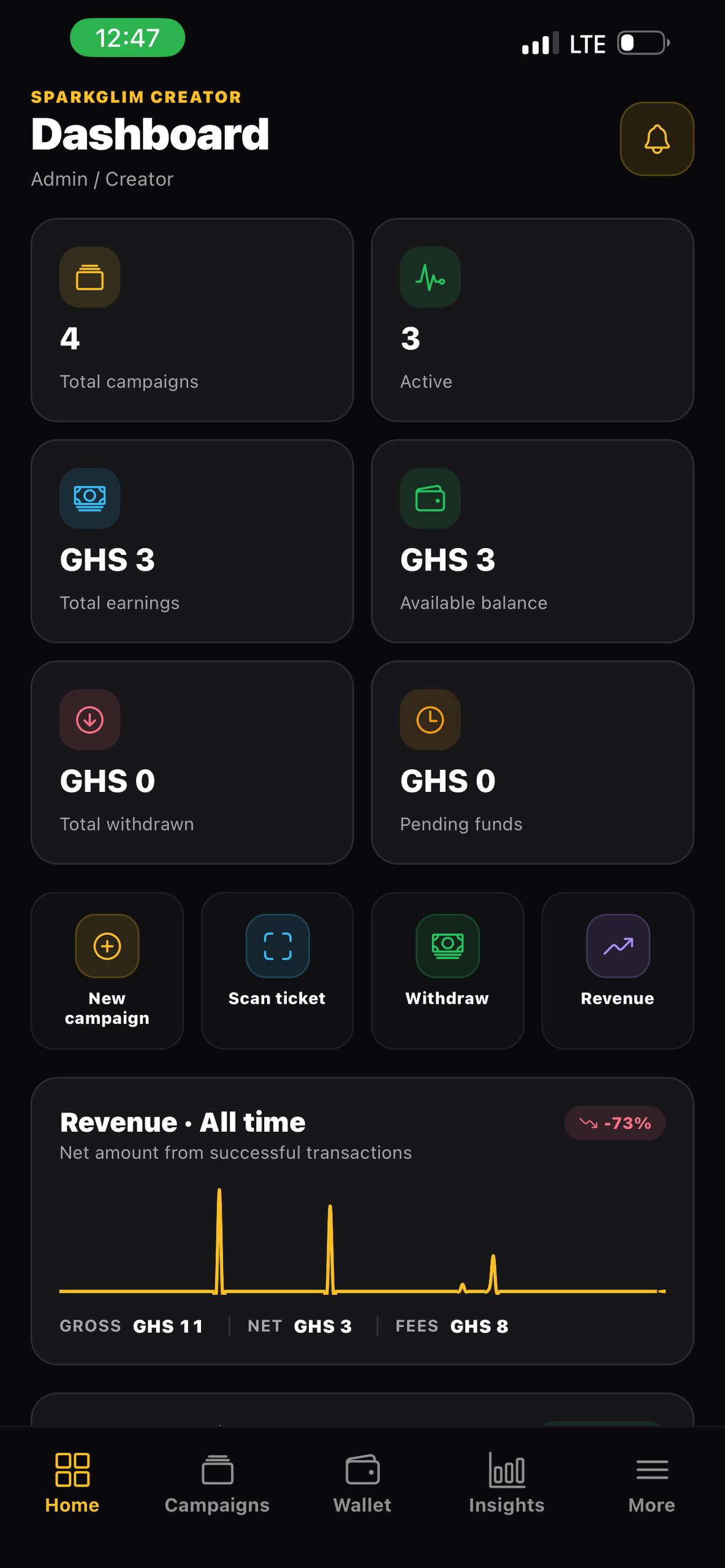
The integrated reports display hourly registration rates and geographic engagement trends. For larger organizations running approved white-label deployments, these metrics can be exported directly to institutional databases for deeper auditing. Having immediate access to this data reduces administrative overhead and minimizes the risk of human error during manual reconciliation processes.
High-Speed QR Ticket Scanning and Gate Verification
On the day of an event, managing entry flow is often the most stressful logistical challenge. The SparkGlim Creator App addresses this by transforming any smartphone into a secure QR ticket scanner. Ticket verification occurs instantly, matching the unique encrypted QR code on the attendee's digital ticket against the live database. This system prevents duplicate entry attempts and validates ticket authenticity in fractions of a second.
To use the scanner, gate personnel simply log into their designated team account on the app, activate the camera interface, and hover over the participant's mobile ticket. The app provides clear visual and haptic feedback indicating whether a ticket is valid, already scanned, or invalid. This direct feedback loop maintains entry speed, preventing bottlenecks at security checkpoints during high-traffic community events.
Wallet Context and Financial Tracking
Transparency in financial tracking builds operational trust. The wallet module in the SparkGlim Creator App provides creators with a clear breakdown of accumulated campaign funds, transaction fees, and pending balances. The dashboard maintains a comprehensive ledger of all transactions, showing exactly when a ticket was purchased or a vote was cast.
Available payment methods and processing workflows vary depending on the country, platform, configuration, and approval of the campaign. In Ghana, popular systems like mobile money (MoMo) are supported alongside standard card transactions. Organizers can review transaction histories, track payout processing times, and verify settlement channels directly within the app, ensuring that accounting teams have constant clarity on incoming revenues.
Team Management and Security Standards
Granular Staff Permissions
Running a major campaign is rarely a one-person job. SparkGlim allows creators to invite team members and assign specific administrative privileges. This ensures that gatekeepers only have access to the QR scanner, while financial details and wallet balances remain restricted to authorized finance officers. This role-based access control protects critical organization settings from unauthorized modifications.
Security and Operational Integrity
While no platform can claim perfect security, SparkGlim implements industry-standard data encryption and secure transmission protocols to protect transaction logs and user identities. The app operates under strict security policies, ensuring that user data is handled in compliance with regional data protection standards. These measures provide campus administrations and corporate organizers with peace of mind regarding compliance.
Instant Push Notifications
The notification center keeps creators informed of every vital milestone. Whether it is a spike in ticket sales, a major fundraising contribution, or an administrative update from the SparkGlim system, the app delivers instant push alerts. These updates can be configured to match your preference, helping you maintain a quiet focus during planning hours or stay highly responsive during live campaigns.
A Step-by-Step Launch Checklist
To help you get started with the SparkGlim ecosystem, we have compiled a checklist for setting up and launching your first successful campaign:
- Account Registration: Visit the SparkGlim Registration Portal and create your creator account. Complete any required verification steps to activate your workspace.
- Download the Mobile App: Ensure you and your core team have downloaded the latest version of the application from the SparkGlim Creator Mobile App portal.
- Configure Your Campaign: Enter your event details, ticket categories, voting structures, or fundraising goals within the creator portal. Make sure to define clear ticket quantities and pricing structures.
- Set Up Team Access: Invite your event coordinators, finance officers, and gate scanning staff, assigning them appropriate operational permissions.
- Test and Launch: Run a test scan with a sample ticket, verify your notification settings, and set your campaign to public to enable public discovery.
Frequently Asked Questions
What platforms is the SparkGlim Creator App available on?
The SparkGlim Creator App is available for mobile devices. You can read download instructions on the SparkGlim Creator Mobile App page.
How does the ticket verification system handle offline or slow network conditions?
The scanner optimizes data payloads for reliable checks. For peak performance, ensure your gate staff have active local mobile data or reliable Wi-Fi.
Can my event staff scan tickets without seeing my wallet balance?
Yes. SparkGlim supports structured team access, allowing you to invite staff members with specific roles like scanners, protecting sensitive financial data.
Which payment options are supported for campaign payouts?
Payout and transaction support varies by region, campaign setup, and approval. In Ghana, popular mobile money networks and card networks are supported.
How can I request help if I experience technical issues during a live event?
You can contact our support team immediately through the SparkGlim contact page for live assistance.
Take Charge of Your Next Campaign
Whether you are coordinating campus elections, managing a national award program, or organizing a ticketed concert, the SparkGlim Creator App provides the mobile tools necessary for seamless execution. By integrating analytics, gate control, team coordination, and wallet transparency into a single platform, you can focus on building outstanding experiences for your audience.
Ready to launch your campaign? Visit the SparkGlim Registration Portal today to create your account and explore our powerful toolkit.
Article gallery
Frequently asked questions
What platforms is the SparkGlim Creator App available on?
The SparkGlim Creator App is available for mobile devices. You can read download instructions on the https://sparkglim.net/creator-mobile-app page.
How does the ticket verification system handle offline or slow network conditions?
The scanner optimizes data payloads for reliable checks. For peak performance, ensure your gate staff have active local mobile data or reliable Wi-Fi.
Can my event staff scan tickets without seeing my wallet balance?
Yes. SparkGlim supports structured team access, allowing you to invite staff members with specific roles like scanners, protecting sensitive financial data.
Which payment options are supported for campaign payouts?
Payout and transaction support varies by region, campaign setup, and approval. In Ghana, popular mobile money networks and card networks are supported.
How can I request help if I experience technical issues during a live event?
You can contact our support team immediately through the https://sparkglim.net/contact page for live assistance.
Found this helpful?


Comments (0)