
Navigating the SparkGlim Event Ecosystem
Securing your spot at an event should be as seamless as attending it. Whether you are looking to attend a campus concert, a professional conference in Accra, or a community fundraising initiative, the SparkGlim user app provides a centralized hub to discover and purchase tickets. By digitizing the ticketing process, we help participants avoid long queues and reduce the risk of misplaced physical documents while providing organizers with a verifiable, real-time method of entry management.
Before you begin the purchase process, ensure you have the SparkGlim app installed on your mobile device. Staying logged into your account helps the system track your ticket purchases, ensuring that your digital passes are safely archived under your user profile for easy access when you arrive at the venue. This guide will walk you through finding your event and completing your transaction securely.
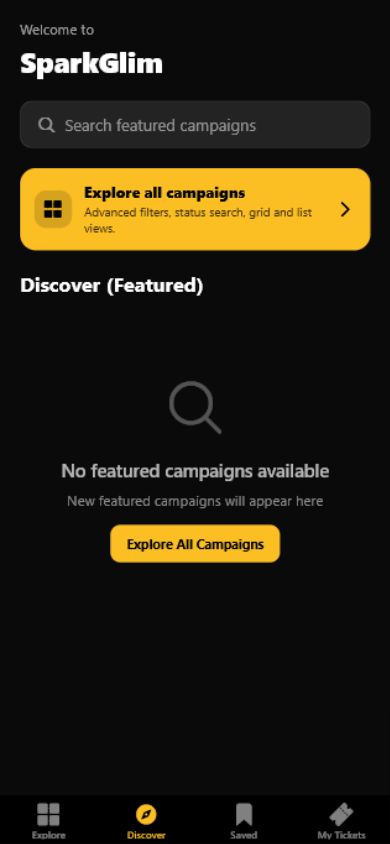
Step 1: Discovering Your Event
Once you are logged into the app, you will land on the main discovery feed. This feed aggregates public campaigns, workshops, and gatherings tailored to your preferences or geographical location. If you are searching for something specific, use the search bar or visit SparkGlim events to filter by date, category, or trending topics.
Inspecting Event Details
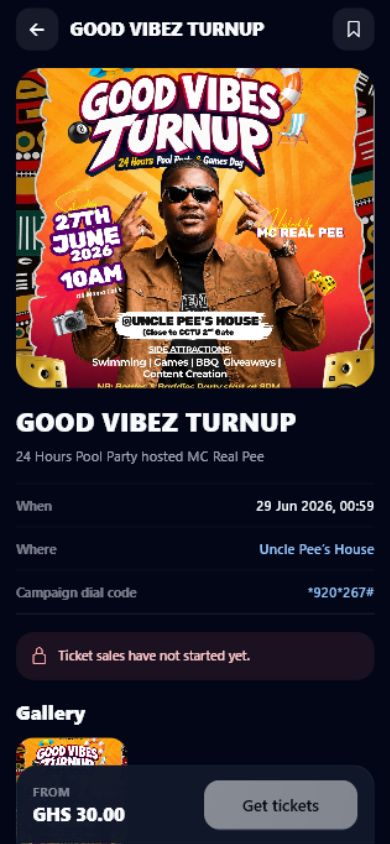
Before clicking the buy button, review the event page thoroughly. A reliable event page will typically contain:
- Event Date and Time: Ensure the schedule aligns with your availability.
- Location Details: Check the venue map or address to plan your transport, especially for events held in busy districts like Osu or East Legon.
- Organizer Information: Verify the host profile to confirm the legitimacy of the event.
- Ticket Tiers: Understand the difference between standard, VIP, or early-bird pricing.
Step 2: Selecting Tickets and Completing Payment
After selecting your preferred ticket tier, indicate the quantity required for your group. The app will automatically calculate the total cost, including any applicable taxes or service fees. Proceed to the checkout screen to finalize the transaction. SparkGlim integrates with various local and international payment methods common in Ghana, such as mobile money (MTN, Vodafone/Telecel, AirtelTigo) and bank-linked card payments. Ensure your internet connection is stable throughout the transaction process to avoid payment timeouts.
Step 3: Storing and Accessing Your Digital Ticket
Once your payment is successfully processed, your digital ticket—often containing a unique QR code—will be generated. You do not need to print this. Instead, navigate to the 'My Tickets' section within your app. This digital wallet serves as your official record of purchase. When you arrive at the venue, open the specific ticket to display the QR code so that the event staff can scan it quickly for entry verification. This method is the fastest way to gain access and helps prevent unauthorized entry by unauthorized copies.
Precautions for Ticket Sharing
Your ticket represents a unique, valid entry. To protect yourself and ensure smooth event access:
- Do not share screenshots: Avoid posting screenshots of your ticket or QR code on social media, as malicious actors could replicate the code to gain entry, effectively invalidating your ticket.
- Keep app access secure: Treat your SparkGlim account credentials with the same care as your mobile banking login.
- Verify official sources: Always access the ticketing platform through our official domain or authorized links provided by the event organizer.
Support and Assistance
While the process is designed to be self-service, technical issues can occasionally arise during payment or ticket retrieval. If you encounter a "transaction pending" status or cannot see your ticket after a successful payment, first refresh your app's home screen. If the issue persists, document the event name and the transaction ID. You can reach out for support by visiting SparkGlim contact to open a support ticket. Providing specific details helps our team resolve your query faster.
Conclusion
Buying event tickets on SparkGlim is built to be a fast, secure, and user-friendly experience. By following the steps outlined—from discovering events to managing your digital tickets in the app—you ensure a stress-free entry into your favorite experiences. Remember to keep your QR codes private and use the official app for all your ticketing needs. Ready to find your next event? Head over to SparkGlim events today and secure your spot.
Frequently Asked Questions
- Question: Where can I find my purchased tickets? Answer: Your tickets are stored in the 'My Tickets' tab within your SparkGlim user app profile. You can access them at any time, even offline, once they have been downloaded.
- Question: What if I lose my phone before the event? Answer: If your phone is lost, simply log in to your SparkGlim account on a new device. Your account details and existing ticket purchases are synced to the cloud and will be available immediately.
- Question: Are ticket refunds managed by SparkGlim? Answer: Refund policies are determined by the individual event organizers. If you need a refund, please contact the organizer directly through the event page or reach out to our support team for guidance.
- Question: Can I purchase tickets for friends using my account? Answer: Yes, you can select the quantity of tickets you need during checkout. Ensure your companions are with you at the gate for entry, or transfer the ticket according to the specific event's rules if the app allows.
Article gallery
Frequently asked questions
Where can I find my purchased tickets?
Your tickets are stored in the 'My Tickets' tab within your SparkGlim user app profile. You can access them at any time, even offline, once they have been downloaded.
What if I lose my phone before the event?
If your phone is lost, simply log in to your SparkGlim account on a new device. Your account details and existing ticket purchases are synced to the cloud and will be available immediately.
Are ticket refunds managed by SparkGlim?
Refund policies are determined by the individual event organizers. If you need a refund, please contact the organizer directly through the event page or reach out to our support team for guidance.
Can I purchase tickets for friends using my account?
Yes, you can select the quantity of tickets you need during checkout. Ensure your companions are with you at the gate for entry, or transfer the ticket according to the specific event's rules if the app allows.
Found this helpful?



Comments (0)