
Digital voting has become an essential tool for community leaders, campus bodies, and event organizers across Ghana and beyond to foster engagement and ensure transparent decision-making. Whether you are participating in a local award show, a student leadership election, or a community fundraising campaign, understanding how to navigate the SparkGlim interface ensures your contribution is recorded accurately and efficiently.
By leveraging our mobile-first platform, voters can participate from anywhere with an internet connection, removing the geographical barriers often associated with traditional voting methods. This guide outlines the standard voter journey on SparkGlim, designed to help you confidently support your preferred nominees while maintaining the integrity of the campaign process.
Step 1: Finding Your Campaign
The first step in the voting process is locating the correct campaign. Most organizers distribute direct links through social media, WhatsApp, or official event posters. If you do not have a direct link, you can browse active campaigns by visiting SparkGlim digital voting to see current public events. Always ensure you are accessing the platform through official channels to avoid phishing attempts or unverified links.
Step 2: Confirming Your Nominee
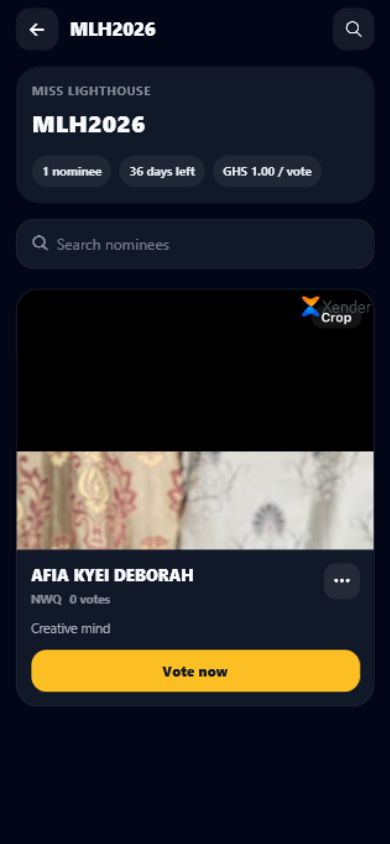
Once you are on the campaign page, you will see a list of nominees or project options. Take a moment to verify the spelling of the name or the specific nominee code provided by the campaign organizer. Accuracy here is vital, as digital votes are processed in real-time. Review the details provided on the candidate profile to ensure your support is directed to the correct individual or entry.
Step 3: Choosing Vote Quantity
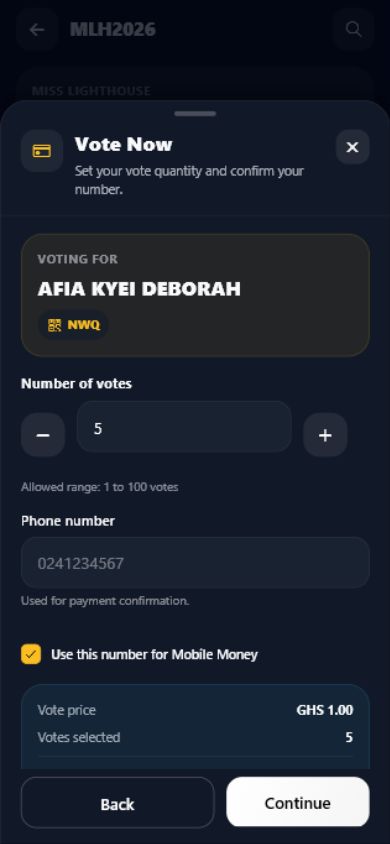
After selecting your nominee, you will be prompted to choose the quantity of votes you wish to cast. Depending on the configuration set by the organizer, you might have the option to buy a single vote or a bulk package. Note that vote limits are often established by organizers to maintain fairness across the competition.
Step 4: Review and Payment
Before proceeding to checkout, a summary screen will display your choices. Review the total cost and the number of votes selected. SparkGlim supports various regional payment methods tailored to the local market, including mobile money services common in Ghana and other electronic payment gateways. Ensure your payment information is entered correctly within the secure payment window.
Post-Payment Checklist
- Check for a transaction success notification on the screen.
- Wait for an SMS or email confirmation if the campaign organizer has enabled notifications.
- Keep a record of your transaction ID in case of future inquiries.
Troubleshooting Common Issues
If you encounter difficulties during your transaction, such as payment failure or a missing confirmation, stay calm. First, verify that your network connection is stable. Second, check your mobile money wallet or bank statement to see if the funds were deducted. If the funds were deducted but your votes do not appear, please reach out to the organizer directly or use the SparkGlim contact page for further assistance. For general updates and platform features, visit the SparkGlim app portal.
Conclusion
Participating in digital voting on SparkGlim is a straightforward process designed to prioritize user experience and transparency. By following these steps—discovering your campaign, confirming your nominee, and verifying your payment—you play an active role in the success of events and competitions in your community. We encourage all users to interact with our platform responsibly and to support the organizers who bring these exciting initiatives to life.
Frequently Asked Questions
Is my voting transaction secure on SparkGlim?
SparkGlim uses encrypted payment gateways to process transactions. While no platform can guarantee absolute security, we employ standard digital security measures to ensure your data is handled professionally during the checkout process.
What should I do if I vote for the wrong nominee?
Once a vote transaction is completed and the digital record is updated, it generally cannot be reversed. Please ensure you carefully review your selection on the summary page before clicking the final payment button.
Why am I not receiving a confirmation for my votes?
Confirmations are subject to the campaign's specific settings. If you do not receive a notification, check your spam folder or verify your contact details with the organizer. If the issue persists, contact our support team through the official website.
Are all campaigns on SparkGlim free to participate in?
Some campaigns are free to vote in, while others may involve a fee to support the event costs or fundraising goals. This is decided entirely by the event organizer. Always check the campaign page for details on costs before you start the voting process.
Ready to engage? Start by exploring our current digital voting campaigns at SparkGlim Digital Voting.
Article gallery
Frequently asked questions
Is my voting transaction secure on SparkGlim?
SparkGlim uses encrypted payment gateways to process transactions. While no platform can guarantee absolute security, we employ standard digital security measures to ensure your data is handled professionally during the checkout process.
What should I do if I vote for the wrong nominee?
Once a vote transaction is completed and the digital record is updated, it generally cannot be reversed. Please ensure you carefully review your selection on the summary page before clicking the final payment button.
Why am I not receiving a confirmation for my votes?
Confirmations are subject to the campaign's specific settings. If you do not receive a notification, check your spam folder or verify your contact details with the organizer. If the issue persists, contact our support team through the official website.
Are all campaigns on SparkGlim free to participate in?
Some campaigns are free to vote in, while others may involve a fee to support the event costs or fundraising goals. This is decided entirely by the event organizer. Always check the campaign page for details on costs before you start the voting process.
Found this helpful?



Comments (0)