
Understanding Digital Voting Campaigns
Digital voting campaigns have revolutionized how student representative councils (SRC) at institutions like the University of Ghana and KNUST, national creative associations, and corporate boards gather opinions and elect leaders. Transitioning from physical ballot boxes to an online environment eliminates paper waste, reduces human counting errors, and allows voters to participate from anywhere. However, launching a successful campaign requires meticulous preparation, structured guidelines, and a platform that ensures transacted votes are recorded accurately and transparently.
To run a secure and smooth digital voting event, organizers must carefully coordinate their rules, categories, nominee information, and visibility settings before opening the polls to the public. Platforms like SparkGlim offer specialized digital voting modules designed to balance administrative control with an intuitive voter experience. By understanding the end-to-end setup process, campaign managers can maintain system integrity, maximize voter turnout, and deliver undeniable results that the community can trust.
Step 1: Establishing Campaign Rules and Timelines
Before uploading any nominee data, you must clearly define the rules of your election or award show. These rules act as a contract between the organizers, the candidates, and the electorate. Start by setting definitive start and end dates down to the exact hour. Clear timelines prevent disputes regarding late submissions or votes cast after the official close of the poll.
Defining Vote Eligibility and Limits
Consider who is authorized to vote. For university department elections, you may want to limit participation to registered students, whereas public entertainment awards usually welcome votes from the general populace. Decide whether voters are restricted to a single vote or if they can purchase multiple vote quantities. While public voting campaigns often leverage multiple vote quantities to drive high engagement, strictly regulated elections must enforce one-vote-per-user limits to maintain democratic fairness.
Step 2: Structuring Categories and Nominee Data
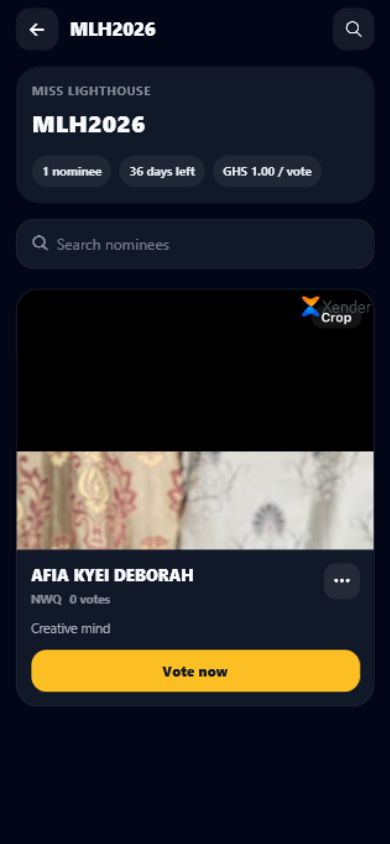
A secure voting campaign is built on organized data. Group your nominees into logical categories, such as Artist of the Year or SRC President. Each category should contain uniform profiles for all nominees to ensure no candidate receives an unfair advantage due to presentation differences. Gather high-resolution profile images, standardized biographies, and correct spelling of names prior to configuration.
Inaccurate nominee information can lead to voter confusion and post-election complaints. On SparkGlim, you can input detailed candidate profiles that voters can easily browse. Having a clear layout helps voters confirm they are supporting the correct individual before finalizing their choice.
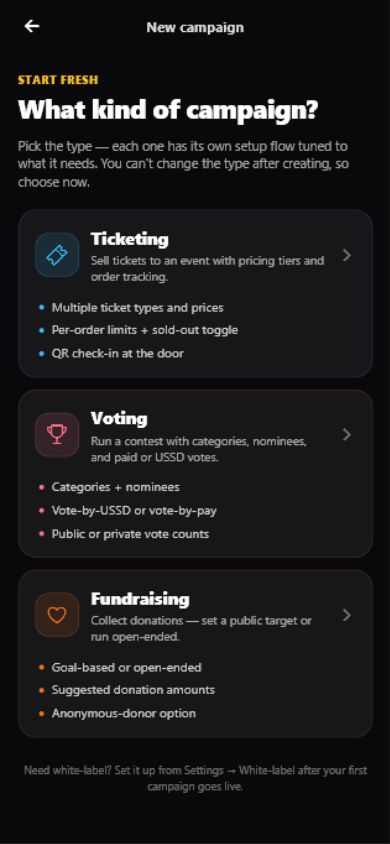
Step 3: Configuring Pricing, Currencies, and Campaign Visibility
Organizers must decide whether the voting campaign will be free or paid. Paid voting is highly popular across West Africa, particularly in Ghana, Nigeria, and Kenya, where organizing committees use voting proceeds to fund event production, prizes, and administrative costs. If you choose a paid voting model, you must specify the price per vote in the local currency, such as Ghanaian Cedis (GHS).
Visibility settings also play a key role in campaign security and reach. You can configure your campaign to be public, meaning it will appear on SparkGlim's public discovery pages where anyone can find and participate. Alternatively, private campaigns can only be accessed through a direct link shared with specific stakeholders, which is ideal for internal corporate decisions or private association polls.
Step 4: Executing Thorough Testing and Verification
Never open a voting campaign to the public without conducting rigorous test runs. Create a mock category with test nominees and cast trial votes using different devices. Ensure that vote quantities are calculated correctly and that the user interface displays the nominee details exactly as intended. This phase helps you spot typographical errors or configuration mistakes before they impact real participants.
Verify the payment flow if you are running a paid voting campaign. Ensure that different payment methods, such as mobile money wallets and local cards, process transactions smoothly. Observing how the system handles high-volume transactions during testing gives your team the confidence needed for a successful launch.
Step 5: Monitoring Activity and Managing Team Access
Once the campaign goes live, continuous monitoring is vital to maintaining operational integrity. Organizers should utilize real-time analytics to track vote velocity, identify sudden spikes in activity, and monitor transaction logs. Accessing these insights via the creator mobile app allows managers to stay updated on the move, responding to any inquiries or anomalies immediately.
For large-scale events, managing a campaign is rarely a one-person job. Assign distinct team access roles within your dashboard to ensure designated staff can monitor analytics or verify transactions without having full administrative permissions to alter nominee details or payout settings. This separation of duties protects the campaign from internal errors and external security risks.
Step 6: Communicating Results and Campaign Closeout
When the campaign reaches its pre-set end date, the system should automatically stop accepting votes. To maintain absolute transparency, download the detailed vote reports and transaction logs from your dashboard. These documents serve as the official audit trail for your election.
Share the final results promptly through your organization's official channels. Publishing clear, data-backed winners reassures participants that the process was fair. You can also redirect voters to related upcoming events or fundraising campaigns, turning highly engaged voters into long-term community members.
Essential Digital Voting Setup Checklist
- Define Timeline: Set the exact start and end times, including time zone adjustments.
- Draft Rules: Publish clear terms regarding vote eligibility, limits, and potential tie-breakers.
- Standardize Nominees: Ensure all nominee names, bios, and images are uniform across categories.
- Configure Pricing: Set up free or paid options, choosing appropriate local currency settings.
- Assign Roles: Give team members dashboard access based on their specific operational needs.
- Run Sandbox Tests: Test both free and paid voting flows on mobile and desktop views.
- Monitor Analytics: Track voting trends and transaction statuses during live hours.
Frequently Asked Questions
How do I set up a paid voting campaign on SparkGlim?
To set up a paid voting campaign, navigate to your creator dashboard, define your categories and nominees, choose your target currency, and specify the price per vote. Voters can then purchase vote quantities using supported local payment methods like mobile money or cards, depending on their region and system approval.
Can I limit the number of votes a single user can cast?
Yes, you can set custom rules and vote quantity thresholds within your campaign parameters. While some public awards allow unlimited paid voting to boost community engagement, campus or corporate elections can be configured to enforce strict vote limits per participant.
How can I track voting activity in real time?
Organizers can monitor vote distributions, transaction logs, and real-time updates directly through the SparkGlim creator dashboard or by using the SparkGlim mobile tools. This allows your team to maintain transparency and quickly identify abnormal voting patterns.
Is it possible to run a private voting campaign?
Yes. SparkGlim allows organizers to toggle campaign visibility. You can keep your voting campaign private and share it via a direct link, or make it publicly discoverable on the SparkGlim homepage to attract broader community participation.
What happens if a voter inputs the wrong nominee code?
To minimize user error, SparkGlim provides clear visual nominee profiles. Voters can search for nominees directly by name or category, select their preferred quantity of votes, and confirm the details on-screen before completing any transaction.
Get Started with Secure Digital Voting
Setting up a transparent, secure, and highly accessible voting campaign has never been more straightforward. Whether you are managing campus elections, national talent awards, or regional industry polls, structured planning combined with powerful creator tools ensures a smooth experience for both nominees and voters. Explore how to leverage custom voter pathways, secure transaction tools, and robust analytics to elevate your next election.
Ready to launch your secure campaign? Register your organizer account on SparkGlim today and build a digital voting experience your audience can trust.
Article gallery
Frequently asked questions
How do I set up a paid voting campaign on SparkGlim?
To set up a paid voting campaign, navigate to your creator dashboard, define your categories and nominees, choose your target currency, and specify the price per vote. Voters can then purchase vote quantities using supported local payment methods like mobile money or cards, depending on their region and system approval.
Can I limit the number of votes a single user can cast?
Yes, you can set custom rules and vote quantity thresholds within your campaign parameters. While some public awards allow unlimited paid voting to boost community engagement, campus or corporate elections can be configured to enforce strict vote limits per participant.
How can I track voting activity in real time?
Organizers can monitor vote distributions, transaction logs, and real-time updates directly through the SparkGlim creator dashboard or by using the SparkGlim mobile tools. This allows your team to maintain transparency and quickly identify abnormal voting patterns.
Is it possible to run a private voting campaign?
Yes. SparkGlim allows organizers to toggle campaign visibility. You can keep your voting campaign private and share it via a direct link, or make it publicly discoverable on the SparkGlim homepage to attract broader community participation.
What happens if a voter inputs the wrong nominee code?
To minimize user error, SparkGlim provides clear visual nominee profiles. Voters can search for nominees directly by name or category, select their preferred quantity of votes, and confirm the details on-screen before completing any transaction.
Found this helpful?


Comments (0)