
The Strategic Advantage of Owned Ticketing Infrastructure
Building an independent ticketing platform is no longer reserved for large-scale enterprise firms. For campus organizations, event promoters, and local businesses, the ability to control the user experience from discovery to entry is a critical operational advantage. SparkGlim provides a robust backend architecture that allows you to shift from being a user of third-party platforms to becoming the owner of your own ticketing ecosystem. By leveraging our white-label infrastructure, you ensure that your brand remains the primary touchpoint for your community, whether you are hosting a gala, a concert, or a university fundraiser.
A successful launch relies on a phased transition from conceptualization to full-scale digital operations. This guide details how to harmonize SparkGlim's backend—covering everything from QR-based access control to USSD-integrated payments—into a cohesive, professional platform. Whether you are operating in the bustling markets of Accra or scaling a regional event chain, the goal is to create a seamless transaction loop that builds trust with your attendees while reducing overhead.

Phase 1: Defining Market Scope and Organizational Approval
Before launching, establish the operational parameters of your platform. Are you focusing on university events, B2B conferences, or community-based fundraising? Define your target audience and the specific features required, such as digital voting or tiered ticketing. Obtain necessary organizational approvals, particularly if your platform represents a student body or a corporate entity. Ensure that your team structure reflects your operational scale, assigning roles for administrative oversight, financial reconciliation, and on-site support.
Phase 2: Branding, Domains, and Digital Identity
Your platform needs a professional face. SparkGlim allows for the implementation of a custom domain, which is essential for establishing brand authority. When customers visit your platform, the environment must reflect your visual identity. Secure your preferred URL and coordinate with our support team to verify the domain settings. A custom domain ensures that your campaign, fundraising page, or ticketing portal stays consistent with your existing marketing assets.
Technical Setup Checklist:
- Select a primary domain that aligns with your brand.
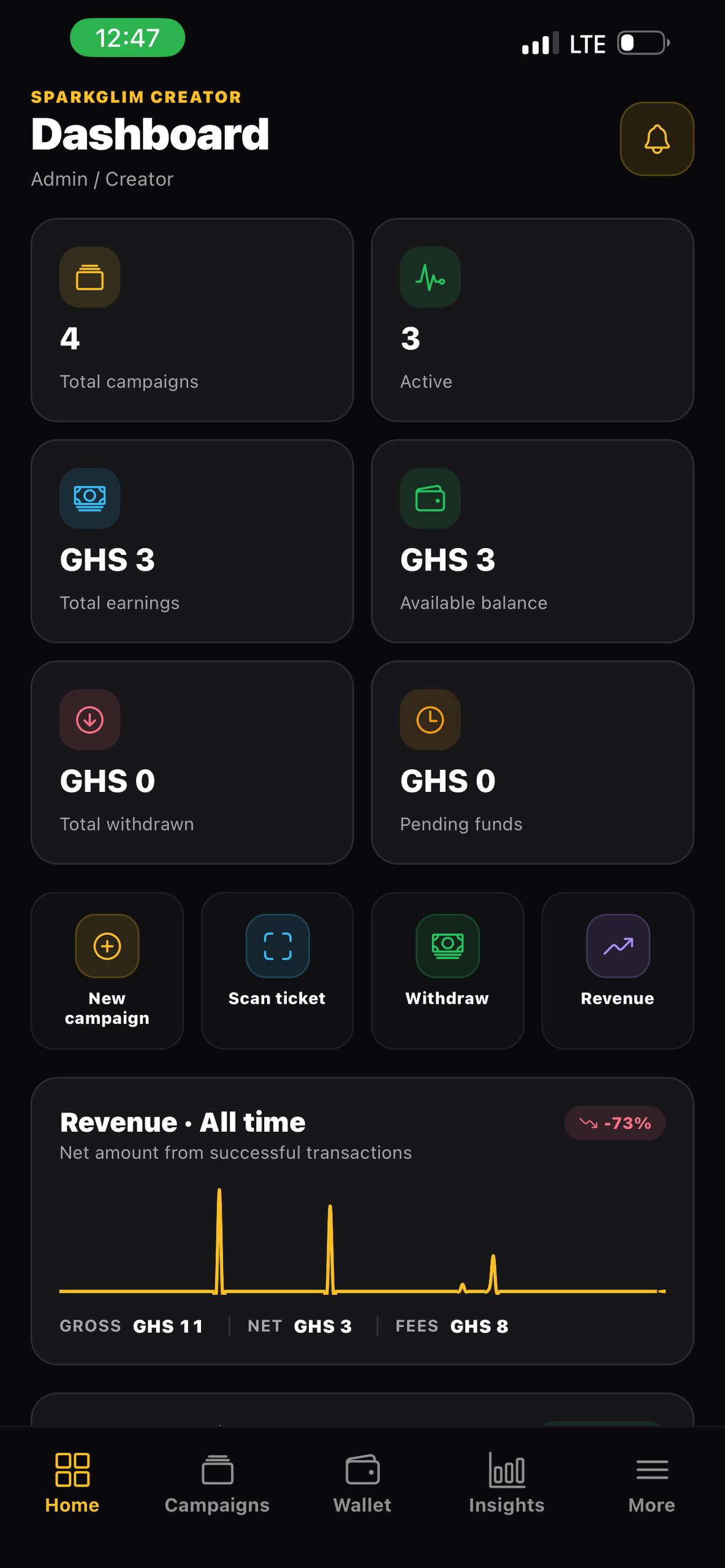
- Configure your logo and brand colors within the SparkGlim creator dashboard.
- Test your campaign links across different browsers to ensure mobile responsiveness.
- Ensure all contact information and support channels are clearly listed on your landing pages.
Phase 3: Campaign Operations and Checkout Optimization
The checkout process is the most sensitive stage of the user journey. To maximize conversion, keep your ticket tiers concise and clearly explained. Use SparkGlim’s payment integration to support local methods, including mobile money and card transactions. For regions with varying digital connectivity, consider configuring USSD payment pathways to capture a broader audience segment. By providing diverse payment options, you remove friction and increase the probability of successful ticket sales.
Phase 4: QR Verification and Operational Security
Efficient entry management is the hallmark of a professional event. SparkGlim's QR verification system replaces manual lists and paper tickets with a secure, digital handshake. Train your event day staff on the verification mobile tools to scan tickets quickly at gates, ensuring a steady flow of attendees. This minimizes queues and reduces the risk of ticket fraud or duplication. Beyond entry, our backend reporting provides you with the exact count of checked-in versus total ticketed users, allowing for real-time logistics adjustments.
Phase 5: Financial Reporting and Risk Control
Maintaining financial visibility is mandatory for any successful organization. Utilize the SparkGlim creator dashboard to export transaction logs and reconciliation reports regularly. Establish strict internal protocols for administrative access, ensuring that only necessary team members have the permissions to withdraw funds or alter event details. Managing risk is an ongoing process—monitor your transaction patterns and verify attendee data to prevent unauthorized activity. By keeping clear records within the platform, you satisfy local auditing requirements while maintaining healthy cash flow management.
Phase 6: Scaling and Support
Once your platform is live, your focus should shift to audience engagement and support. Use notifications to update attendees about schedule changes or venue updates. If you encounter technical hurdles or require adjustments to your white-label configuration, consult our support portal. Scaling involves looking at your analytics—identifying which ticket tiers sold out first and understanding user demographics to inform future campaigns. For those looking to expand their capabilities, explore our full white-label documentation to see how you can further customize your deployment.
Frequently Asked Questions
- Question: Can I use my own domain for my ticketing site? Answer: Yes, SparkGlim supports the verification of custom domains to ensure your brand remains front and center for your customers.
- Question: What payment methods can my platform accept? Answer: Our platform supports web-based card and mobile money payments, along with configured USSD payment channels to reach a wider demographic.
- Question: How do I handle ticket validation at the venue? Answer: SparkGlim provides integrated QR verification tools that allow your team to securely scan and validate tickets on-site using mobile devices.
- Question: Is there a team access feature for managing large events? Answer: Yes, our creator dashboard includes team management settings that allow you to assign specific administrative roles to staff members.
- Question: What should I check before launching my platform? Answer: Ensure your domain is verified, test your payment workflows, train your staff on QR tools, and review our pricing structures to match your operational requirements.
Conclusion
Launching a proprietary ticketing platform is a significant milestone for any event organizer. By leveraging SparkGlim’s robust infrastructure, you gain the ability to provide a world-class experience to your attendees while maintaining the operational control necessary for growth. Success requires meticulous planning, from initial market definition and brand alignment to the final QR scan at the gate. As you build your platform, remain diligent about reporting, security, and the user experience. We invite you to begin your journey by visiting our white-label information page to explore the tools available for your next major launch.
Article gallery
Frequently asked questions
Can I use my own domain for my ticketing site?
Yes, SparkGlim supports the verification of custom domains to ensure your brand remains front and center for your customers.
What payment methods can my platform accept?
Our platform supports web-based card and mobile money payments, along with configured USSD payment channels to reach a wider demographic.
How do I handle ticket validation at the venue?
SparkGlim provides integrated QR verification tools that allow your team to securely scan and validate tickets on-site using mobile devices.
Is there a team access feature for managing large events?
Yes, our creator dashboard includes team management settings that allow you to assign specific administrative roles to staff members.
What should I check before launching my platform?
Ensure your domain is verified, test your payment workflows, train your staff on QR tools, and review our pricing structures to match your operational requirements.
Found this helpful?



Comments (0)